# Передача сведений об объемах работ («Конструктор актов»)

Передача сведений об объеме работ производится с помощью документа «Сообщение об объемах работ» (см. рисунок ниже).

В ИСУП используется название «Конструктор актов».

[![image.png](https://wiki.dacon.pro/uploads/images/gallery/2026-03/scaled-1680-/hB1image.png)](https://wiki.dacon.pro/uploads/images/gallery/2026-03/hB1image.png)
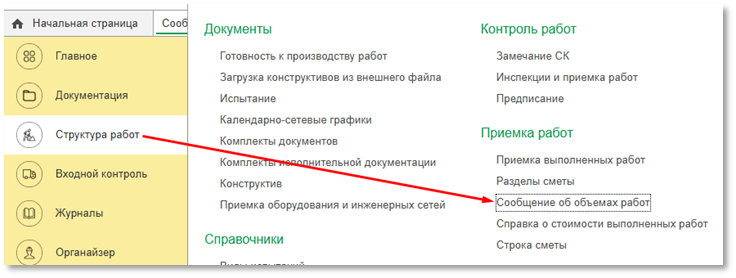
*<span style="font-size: 11.0pt; line-height: 115%; font-family: 'Calibri',sans-serif; mso-ascii-theme-font: minor-latin; mso-hansi-theme-font: minor-latin; mso-bidi-theme-font: minor-latin;">Рис. "Д</span><span style="font-size: 11.0pt; line-height: 115%; font-family: 'Calibri',sans-serif; mso-ascii-theme-font: minor-latin; mso-hansi-theme-font: minor-latin; mso-bidi-theme-font: minor-latin;">окумент «Сообщение об объемах работ»"</span>*

**Шаг 1 – создание Сообщения об объемах работ**

- При создании Сообщения по кнопке «Создать», в открывшейся форме документа необходимо заполнить необходимые реквизиты:
- - - - - Договор
                - Отправил организация
                - Отправил ответственный
                - Дата
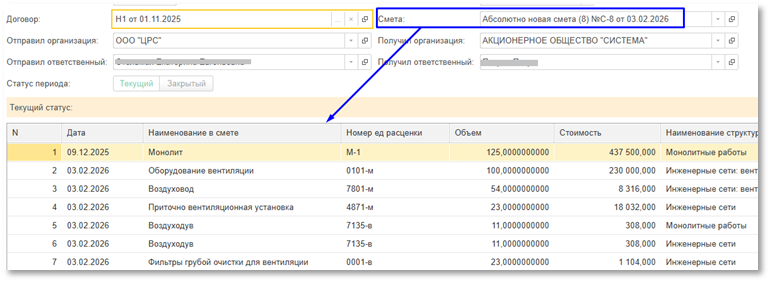
                - Смета
                - Получил организация
                - Получил ответственный
- <span style="font-size: 11.0pt; font-family: 'Calibri',sans-serif; mso-ascii-theme-font: minor-latin; mso-hansi-theme-font: minor-latin; mso-bidi-theme-font: minor-latin;">После указания сметы в табличной части Сообщения будут отражены все работы (см. рисунок ниже):</span>

[![image.png](https://wiki.dacon.pro/uploads/images/gallery/2026-03/scaled-1680-/Z6pimage.png)](https://wiki.dacon.pro/uploads/images/gallery/2026-03/Z6pimage.png)

*<span style="font-size: 11.0pt; line-height: 115%; font-family: 'Calibri',sans-serif; mso-ascii-theme-font: minor-latin; mso-hansi-theme-font: minor-latin; mso-bidi-theme-font: minor-latin;">Рис. "О</span><span style="font-size: 11.0pt; line-height: 115%; font-family: 'Calibri',sans-serif; mso-ascii-theme-font: minor-latin; mso-hansi-theme-font: minor-latin; mso-bidi-theme-font: minor-latin;">тражение работ по смете"</span>*

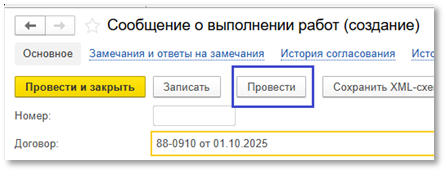
- <span style="font-size: 11.0pt; font-family: 'Calibri',sans-serif; mso-ascii-theme-font: minor-latin; mso-hansi-theme-font: minor-latin; mso-bidi-theme-font: minor-latin;">После чего необходимо нажать «Провести» (см. рисунок ниже):</span>

[![image.png](https://wiki.dacon.pro/uploads/images/gallery/2026-03/scaled-1680-/lFNimage.png)](https://wiki.dacon.pro/uploads/images/gallery/2026-03/lFNimage.png)

*<span style="font-size: 11.0pt; line-height: 115%; font-family: 'Calibri',sans-serif; mso-ascii-theme-font: minor-latin; mso-hansi-theme-font: minor-latin; mso-bidi-theme-font: minor-latin;">Рис. "С</span><span style="font-size: 11.0pt; line-height: 115%; font-family: 'Calibri',sans-serif; mso-ascii-theme-font: minor-latin; mso-hansi-theme-font: minor-latin; mso-bidi-theme-font: minor-latin;">оздание Сообщения о выполнении работ"</span>*

**<span style="mso-fareast-font-family: SimSun; mso-bidi-font-family: Calibri; mso-bidi-theme-font: minor-latin;">Шаг 2 – </span><span style="mso-bidi-font-family: Calibri; mso-bidi-theme-font: minor-latin;">формирование Сообщения о выполнении работ</span>**

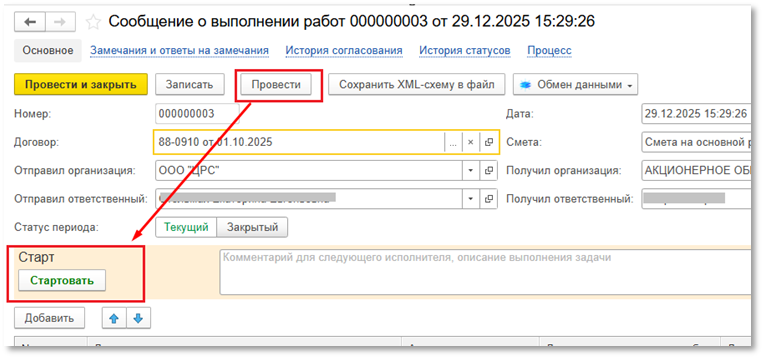
- <span style="font-size: 11.0pt; font-family: 'Calibri',sans-serif; mso-ascii-theme-font: minor-latin; mso-hansi-theme-font: minor-latin; mso-bidi-theme-font: minor-latin;">Необходимо стартовать процесс (см. рисунок ниже):</span>

[![image.png](https://wiki.dacon.pro/uploads/images/gallery/2026-03/scaled-1680-/TwRimage.png)](https://wiki.dacon.pro/uploads/images/gallery/2026-03/TwRimage.png)

*<span style="font-size: 11.0pt; line-height: 115%; font-family: 'Calibri',sans-serif; mso-ascii-theme-font: minor-latin; mso-hansi-theme-font: minor-latin; mso-bidi-theme-font: minor-latin;">Рис. "П</span><span style="font-size: 11.0pt; line-height: 115%; font-family: 'Calibri',sans-serif; mso-ascii-theme-font: minor-latin; mso-hansi-theme-font: minor-latin; mso-bidi-theme-font: minor-latin;">роведение документа"</span>*

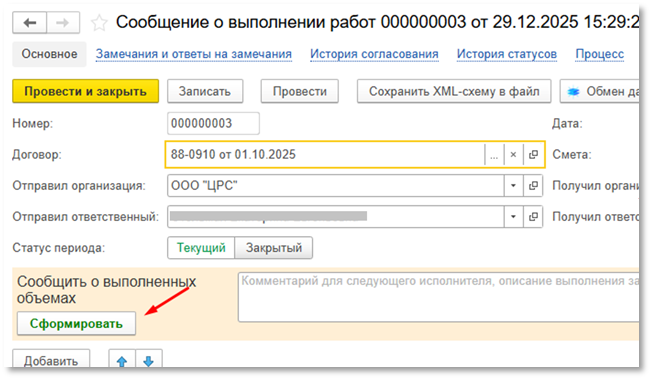
- <span style="font-size: 11.0pt; font-family: 'Calibri',sans-serif; mso-ascii-theme-font: minor-latin; mso-hansi-theme-font: minor-latin; mso-bidi-theme-font: minor-latin;">Далее нажать «Сформировать» (см. рисунок ниже):</span>

[![image.png](https://wiki.dacon.pro/uploads/images/gallery/2026-03/scaled-1680-/VUIimage.png)](https://wiki.dacon.pro/uploads/images/gallery/2026-03/VUIimage.png)

*<span style="font-size: 11.0pt; line-height: 115%; font-family: 'Calibri',sans-serif; mso-ascii-theme-font: minor-latin; mso-hansi-theme-font: minor-latin; mso-bidi-theme-font: minor-latin;">Рис. "Ф</span><span style="font-size: 11.0pt; line-height: 115%; font-family: 'Calibri',sans-serif; mso-ascii-theme-font: minor-latin; mso-hansi-theme-font: minor-latin; mso-bidi-theme-font: minor-latin;">ормирование сообщения"</span>*

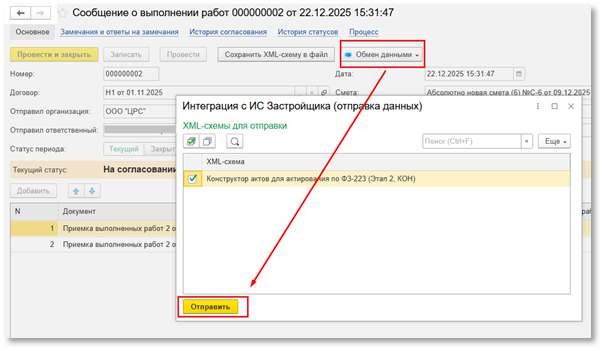
**<span style="mso-bidi-font-family: Calibri; mso-bidi-theme-font: minor-latin;">Шаг 3 – отправка Застройщику </span>**<span style="mso-bidi-font-family: Calibri; mso-bidi-theme-font: minor-latin;">(см. рисунок ниже):</span>

[![image.png](https://wiki.dacon.pro/uploads/images/gallery/2026-03/scaled-1680-/nRnimage.png)](https://wiki.dacon.pro/uploads/images/gallery/2026-03/nRnimage.png)

*<span style="font-size: 11.0pt; line-height: 115%; font-family: 'Calibri',sans-serif; mso-ascii-theme-font: minor-latin; mso-hansi-theme-font: minor-latin; mso-bidi-theme-font: minor-latin;">Рис. "О</span><span style="font-size: 11.0pt; line-height: 115%; font-family: 'Calibri',sans-serif; mso-ascii-theme-font: minor-latin; mso-hansi-theme-font: minor-latin; mso-bidi-theme-font: minor-latin;">тправка сообщения о выполнении работ Застройщику"</span>*